
System Integration / Command and control
Central Management System for Security and Safety
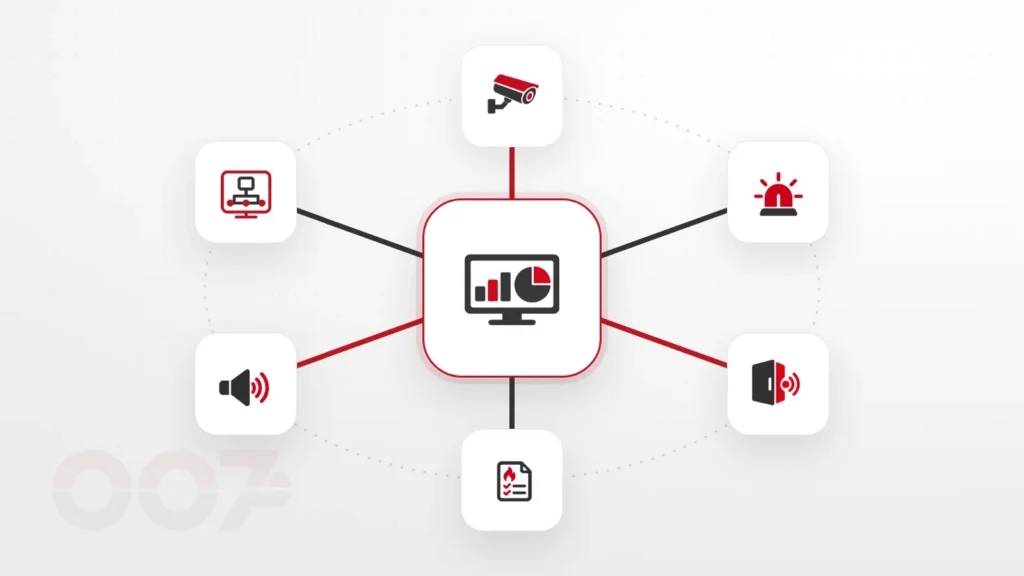
A central management system brings the cameras, alarm, access control, fire detection and PA together on one screen — one overall picture and event management from one place.
Example scenario
One event, one screen



- One of the systems reports an event — an alarm, a door opened or a fault.
- The management system displays it on one screen, together with everything related to it.
- The operator sees where it happened, views the nearest camera, and everything is recorded in the log.
The scenario is illustrative. The actual activations are set according to the building's design and the safety consultant's instructions.
What the service includes
What a central management system includes
Mapping systems
A list of the systems on site, the manufacturers and each one's ability to connect to a shared interface.
Unified display
Site maps, statuses and events from different systems on one screen.
Event management
Each event is displayed with its location, the relevant camera and the actions to take.
Control from the interface
Actions such as opening a door or switching to a camera view, according to the systems' capabilities and permissions.
Permissions and users
Defining who sees what and who is authorized to perform each action.
Log and documentation
A history of events and actions, for debriefing and improving procedures.
How we work
From separate systems to one control center.
We start from what the site already has, and connect gradually in order of priority.
-
Mapping
Which systems exist and how they can be connected.
-
Specification
What the operator needs to see and do in each scenario.
-
Setup and connection
Installing the interface and connecting the systems.
-
Training and handover
Training operators and documenting the settings.
Before choosing software
Start with the operator, not the screen.
A good management system is measured by how quickly the operator understands what is happening and what to do. That’s why we start by specifying the actual work scenarios, and only then choose the platform and how each system is connected.
When do you need a central management system
An organization with several security and safety systems — and sometimes several buildings — quickly reaches a situation where each system has its own screen, software and password. A central management system (sometimes also called PSIM or a command and control system) connects them all into one interface, in which every event is displayed with its location, the relevant camera and the actions to take.
Control room, office or remote
The system can serve a staffed control room, a reception desk or a maintenance manager working from the phone. Permissions determine who sees what and who is authorized to perform each action, and the event log makes it possible to debrief after every event.
Start from what you already have
You don’t need to replace all the systems to connect them. We check which ones support connection to a shared interface, and connect gradually — usually starting with the cameras and access control. The service is available to organizations in the North — from Netanya and Hadera, through Haifa, Afula and Nof HaGalil, to Kiryat Shmona and the Golan Heights.
Frequently asked questions
Frequently asked questions about a central management system
Do the existing systems need to be replaced?
Not necessarily. We check which systems support connection to a shared interface; sometimes an interface or a targeted upgrade is enough.
Can the system be managed remotely?
Yes, subject to the systems’ capabilities and the organization’s information security settings.
Is this suitable for a small site too?
A central management system pays off mainly when there are several systems or several buildings. On a small site a shared app is sometimes enough — and we’ll tell you so.
What does the training stage include?
Training operators in routine work and event handling, and documenting the system settings.
What is PSIM?
PSIM is a general name for software that brings information and control from different security systems into one interface. In practice the platform is chosen according to the existing systems on site and the operators’ needs.
Which areas do you set up management systems in?
Across the North — from Netanya and Hadera, through Haifa, Afula and Nof HaGalil, to Kiryat Shmona and the Golan Heights.
Want to bring your systems onto one screen?
Tell us which systems the site has, and we'll check what can be connected.